The speed tax hiding inside Shopify cart drawers
Cart drawer apps often ship JavaScript and CSS to every page, including features you turned off. Here is how that shows up in Core Web Vitals, conversion, and search, and how Photon Cart was designed so unused features never load.
By Photon Apps · · 16 min read
Written by the team at Photon Apps, a Shopify app studio of Simplileap Digital LLP in Bengaluru. We implement Shopify stores for clients and build Photon Cart.

We build Shopify stores for clients, and we also build the cart those stores open. The same complaint shows up in both jobs. A merchant installs a cart drawer because the theme cart feels thin. Average order value is the pitch. A week later someone pastes a PageSpeed report into the project channel and asks why the mobile score fell off a cliff. The drawer is usually the new weight.
This is the first note in a short series on problems we keep seeing in the cart-drawer category. Speed is the one that leaks into everything else: how fast a product can be added, how the store feels on a mid-range phone, and whether search and ads are sending people to a page that already spent its budget on someone else's JavaScript.
The short answer
A Shopify cart drawer slows a store when its JavaScript and CSS are injected on templates that do not need them, when disabled features still download, and when every quantity change waits on a heavy re-render. That cost shows up as slower Largest Contentful Paint, worse Interaction to Next Paint, and a lower mobile PageSpeed score. On a large catalogue the same bundle is paid on every landing, not once at checkout.
Photon Cart was built so a feature that is off does not ship a script, assets are compressed and delayed, and code runs on the pages that actually open the drawer. Add, increase, and decrease are treated as interactions that have to feel immediate, not as an afterthought once the upsell modules are done.
What we keep seeing on client builds
A typical engagement is not a greenfield theme. It is a store that already sells. The theme is custom or heavily edited. Apps are stacked for reviews, search, subscriptions, and loyalty. The cart is the last surface merchants touch, and it is the one they are most willing to replace, because the promise is concrete: a free-shipping bar, a gift threshold, a one-click add from inside the drawer.
The install is easy. Shopify theme app embeds and older script tags are designed that way. Enable the embed, the drawer appears on the storefront, and the merchant can style it in an admin. What the install screen does not show is the request list. On a product page, a collection page, the home page, and often a content page, the same app origin starts requesting a vendor bundle, a CSS file, sometimes a font, sometimes a recommendations endpoint, sometimes an analytics pixel that belongs to the app rather than the merchant.
We have tested quite a few drawers in this category while scoping client work. We are not going to dress that up as a public bake-off. We did not publish a table of named competitors with Lighthouse scores, because a single lab run on one theme is easy to game and unfair to quote. The pattern was consistent enough that the names stopped mattering. The bundle arrived on pages where the drawer was never opened. Features the merchant had switched off were still in the payload, or they were gated in the UI while the code that implemented them still downloaded. Adding a product, or tapping plus and minus, stuttered. The network panel showed the cart response, then a long stretch of main-thread work before the quantity on screen matched the tap.
On a small catalogue you can absorb that. On a store with large collection grids, heavy image templates, and paid traffic landing on product pages, it is not a rounding error. It is a tax on every session.
What a drawer is supposed to cost
A cart drawer has a real job. It has to read the cart, render line items, update quantities, apply the merchant's modules, and stay in sync with Shopify's cart. That work cannot be free. A serious drawer will use some JavaScript. It will use some CSS. It will call the Cart Ajax API. Pretending otherwise is how you get a pretty demo that falls over on a real theme.
The question is when that cost is paid, and who pays it.
A shopper who never opens the cart should not download the code that paints upsells, gift progress, or a survey. A shopper on a policy page should not download it either. A merchant who turned the birthday collector off should not ship the birthday collector. A tap on plus should update the line immediately and reconcile with Shopify, instead of freezing the row until a large framework re-renders the whole sheet.
Those are product decisions. They are also scheduling decisions. If you bolt performance on after the feature list is frozen, you are deleting code you already shipped to customers. We treated the loading rules as part of the design of Photon Cart, in the same pass as the modules, because a drawer that only feels fast in a screen recording is not a drawer we were willing to put on a client store.
Why the weight lands on every page
Shopify's online store is a set of Liquid templates. An app that wants to be present when someone clicks a cart icon has to be present before that click, unless it is willing to load itself on demand. The convenient implementation is an app embed in the theme layout, or a script tag registered for the shop. Both run in the context of the storefront as a whole. The app author then decides whether to keep going.
Many do keep going. One bundle is simpler to cache, simpler to version, and simpler to debug. Feature flags in the admin become if-statements inside a file that has already been fetched. The merchant experiences the flag as "off." The browser experiences it as "parsed." Parsing and compiling JavaScript on a mobile CPU is work even when the function never runs. CSS that hides a module with display:none is still CSS the browser has to match.
There is a second convenience: third-party recommendations and analytics. A drawer that upsells from a remote model wants its SDK early, so the suggestions are ready when the drawer opens. Ready is not the same as necessary. If the request starts at first paint, it competes with the hero image, the theme's own JavaScript, and every other app embed. Largest Contentful Paint does not care that the script was "for the cart later."
Google's Core Web Vitals draw a practical line around this. As documented on web.dev, a good Largest Contentful Paint is 2.5 seconds or less, a good Interaction to Next Paint is 200 milliseconds or less, and a good Cumulative Layout Shift is 0.1 or less. Those are not Shopify settings. They are the thresholds Google uses when it talks about a page feeling fast. A cart bundle that delays the main content, or that blocks the main thread while a shopper taps quantity, is arguing with those thresholds on every template it touches.
How the bloat actually arrives
The stores we audit rarely have one smoking gun. They have a pile of reasonable decisions.
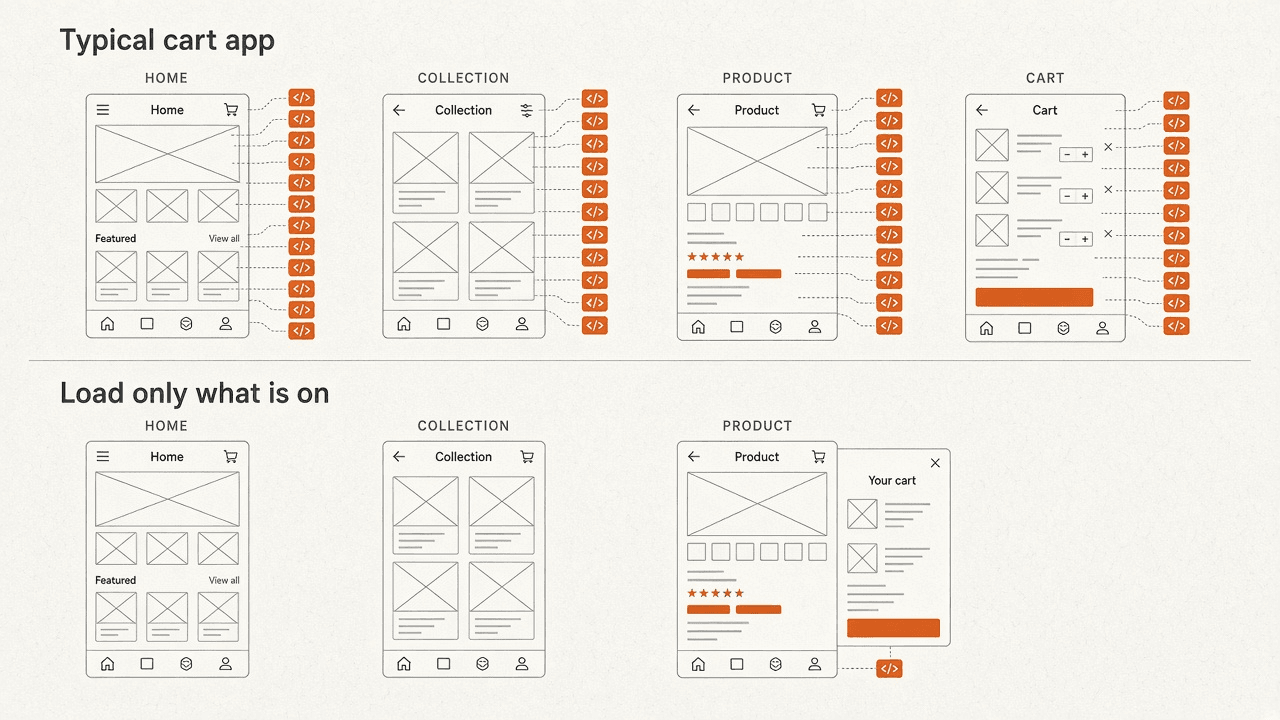
The first is global injection. The embed is on, so the asset graph is on, including templates that never render a product form. Home, collection, product, blog, and a custom landing page for an ad all pay the same entry file. Collection pages are often the worst place for it. They are already doing a lot of image and filter work, and they are a common paid-traffic landing.
The second is dead features that are not dead. The admin shows a toggle. The storefront still requests the module, or it requests a single hashed file that contains every module. Tree-shaking does not save you if the feature flags are data, evaluated at runtime, and the bundler cannot see them. The only reliable version of "off" is: that URL is not in the HTML.
The third is eager work at startup. Listeners on every add-to-cart form, a mutation observer on document.body, a poll against cart.js, a font download for a drawer that is closed, a stylesheet that is render-blocking because it was linked in the head without a reason. None of these lines look dramatic in a code review. Together they sit on the critical path of a page whose job was to show a product.
The fourth is main-thread tax after the click. This one does not always crush the lab LCP score, which is why teams miss it. The page "loads." Then the merchant's own staff, testing on a laptop, feel a hitch when they change quantity. On a phone that hitch is the product. Interaction to Next Paint was built for exactly this class of bug: the tap happened, the next paint did not. A drawer that re-renders a large tree, remeasures a progress bar, and re-fetches recommendations on every increment will fail that test while the hero image still looks fine in a screenshot.
Compression does not fix an architecture problem, but its absence makes every problem louder. Unminified bundles, uncompressed transfers, and duplicate copies of a utility library are still common in app assets we inspect. Gzip or Brotli is the minimum. It is not a strategy. A 400 kilobyte file that becomes 120 kilobyte on the wire still has to be parsed at 400.
What the published research actually supports
We would rather cite a study with a methodology than invent a before-and-after from one client's theme.
In 2020, Google published Milliseconds Make Millions, research by Deloitte and 55. The team watched mobile sessions across 37 retail, travel, luxury, and lead-generation brands in Europe and the US, on the order of 30 million sessions, with no redesigns during the window. They looked at hours where four speed metrics each moved by about a tenth of a second: how soon primary content first painted, input latency, observed load, and server latency. For retail, that tenth of a second lined up with an 8.4 percent higher conversion rate and about 9.2 percent higher spend. The step from product page toward add-to-basket was especially sensitive.
Read that carefully. It is a correlation from natural speed fluctuation, not a controlled experiment in which someone uninstalled a cart app. It is not permission to promise an 8.4 percent revenue lift because you changed drawers. It is evidence that small mobile delays, measured across real brands, show up in the funnel, and that the product-to-cart step is one of the places shoppers notice.
That matches what we see qualitatively, without pretending our client sample is a paper. When a drawer makes add-to-cart feel late, people hesitate, tap again, or leave the line item wrong and lose trust. You do not need a lab to watch that. You do need a lab, and field data, before you put a number on it.
PageSpeed Insights and Lighthouse are still worth running. They are a consistent way to see render-blocking files, unused JavaScript, and main-thread time. They are a bad way to declare a winner between two apps after one run on a throttled profile. Field data in the Chrome User Experience Report, which is what the Core Web Vitals report in Search Console is built from, is the closer picture of real phones on real networks. If you only have lab data, say so.
PageSpeed, conversion, and search
Merchants talk about "the Google score" as if it were one thing. It is several.
The PageSpeed score is a Lighthouse lab score. It is sensitive to unused JavaScript, to render-blocking CSS, and to how long the main thread is busy. A cart app that ships a large bundle to every template will move that score. On a heavy store the move is obvious, because the theme was already close to the budget. We have watched that happen often enough to treat "install the drawer, then re-test mobile" as a standard step, not a nice-to-have.
Conversion is the part the Deloitte research speaks to, with the caveat above. Speed is not the only reason people buy. Offer, price, trust, and shipping rules still dominate. Speed is the part a cart app can quietly damage after the offer is already good. A slower product page wastes the traffic you paid for. A sluggish quantity control wastes the moment after they said yes.
Search is the part that gets oversold. Google has said Core Web Vitals are part of how it understands page experience, and page experience is among the signals it uses. It has also been plain that relevant content still carries the ranking. A fast store with thin product copy will not outrank a slower store that answers the query. A slow store can still rank and still bleed revenue. We tell clients to fix the drawer because of the sessions they already have, and to treat any SEO benefit as a consequence of a page that is easier to render and easier to use, not as the reason to do the work.
There is a practical SEO effect that has nothing to do with a secret ranking multiplier. If your templates are bloated, your HTML is slower to fetch and your crawl budget on a very large catalogue is spent on pages that take longer to process. If layout jumps when a drawer stylesheet arrives late, Cumulative Layout Shift moves, and the page feels broken in a way shoppers and quality systems both notice. Those are ordinary engineering facts. They do not require a myth about a score of 100.
The lag that never shows up in a screenshot
Most write-ups stop at page load. The complaint we hear from operators is about the drawer itself.
They add a product from a collection grid. The button spins, or nothing happens, and then the drawer opens with the line already stale. They tap plus. The number waits. They tap again because they are not sure the first tap counted, and the quantity jumps by two once the responses land out of order. They open the drawer on a phone and scroll the cart while a progress bar and a recommendation row reflow.
Under the hood, the slow versions usually do one of three things. They wait for the network before they change the UI at all. They replace the entire drawer DOM from a rendered HTML string on every change. Or they serialise poorly: each tap sends a cart change request, and the UI is a pure function of the last response, with no protection against responses arriving late.
A sound design does the opposite. The line quantity updates in the interface immediately. The request to Shopify is in flight. If it fails, the line rolls back and the shopper sees an error. If an older response arrives after a newer tap, it is ignored. Recommendations and non-essential modules do not run on the same turn as the quantity change. That is ordinary interface architecture. It is also the difference between a drawer that feels like part of the theme and a drawer that feels like a second site embedded in the corner.
We held Photon Cart to that bar while the modules were being designed, not as a polish pass. The point of a side cart is that it stays out of the way until you need it, and then it keeps up with your hand. A lagging quantity control breaks the only moment the app is justified.
What we refused to ship
These are the rules we actually built against. They are not a Lighthouse certificate, and we are not publishing a score we did not measure in public.
A feature that is not enabled does not add its JavaScript or its other assets. Off means absent from the page, not hidden.
Resources are compressed, and they are delayed when the page can paint without them. The drawer does not get to compete with the first product image just so an upsell is pre-warmed for a shopper who may never open the cart.
Assets are requested on the templates where the cart is part of the visit, not on every URL the theme can render. A page that cannot open the drawer should not host the drawer.
Where a file can wait, it waits. Startup work is the expensive kind. Work after an intentional click is easier to justify, and even then it should be the smallest slice that can answer the click.
The interaction path for add, increase, and decrease is designed so the shopper sees the result without waiting on unrelated modules. That falls out of the system design. It is not a special case we hope to tune later if a merchant complains.
If you want the module list those rules apply to, it is on the Photon Cart page: announcement bar, shipping goal, gifts, upsells, cross-sell, bundles, discounts, and the rest. The performance rule does not change because a module is commercially attractive. An upsell that only works by slowing the product page is an expensive upsell.
How to audit the drawer you have now
You can do this in an afternoon. You do not need our app installed to learn whether the current one is taxing you.
- Open a product page in Chrome, with the drawer closed, and record a performance trace that includes load and a quantity change. Note long tasks on the main thread and which script URLs they belong to.
- In the network panel, filter by the app's domain. Reload the home page, a collection, a product, and a page that should be quiet, such as a policy or article template. If the same large script appears everywhere, the embed is global.
- Turn one module off in the app admin. Hard-reload. If the script list and the transferred bytes barely change, the toggle is cosmetic.
- Throttle the CPU in performance tools, then tap plus three times quickly. Watch whether the number on the line follows your taps or follows the network.
- Run PageSpeed Insights on the product URL and read the field data if it exists, not only the lab score. Then run it on a collection URL. Compare unused JavaScript and render-blocking requests before you compare the headline number.
- Disable the app embed in a duplicated theme, preview, and repeat the product trace. The delta is the honest cost of that app on that theme. One URL is not a verdict. Three templates usually are.
Keep a note of what else is on the store. Reviews, chat, and personalisation scripts pile up. A cart audit that ignores them will blame the drawer for a main thread everyone shares. Remove or delay one thing at a time or you will "prove" the wrong cause.
What we are not claiming
We are not claiming that every other cart drawer is unusable, or that a slow score has a single author. Themes ship a lot of their own JavaScript. Apps the merchant wants, and apps nobody remembers installing, share the page. A drawer can be well built and still sit on top of a heavy theme.
We are not claiming Photon Cart has a universal PageSpeed number. Your theme, your image strategy, your other apps, and your traffic mix decide the field data. What we can stand behind is the loading model: unused features stay off the page, files are compressed and delayed, and they show up where the cart is actually used. If a future module cannot meet that, it does not get to skip the rule because it demos well.
We are also not claiming that speed replaces a clear offer. A fast drawer with a confusing gift threshold still fails. Performance is the part we got tired of watching other tools treat as optional.
Questions we get from merchants
Do cart drawer apps always slow a Shopify store?
No. A drawer has to use some code. It slows the store when that code is large, global, and indifferent to which features you enabled. A drawer that loads a small slice on the templates where the cart exists, and loads the rest on intent, can be compatible with a fast product page. The category has a habit of choosing the global bundle. The habit is the problem, not the idea of a drawer.
Will a lower PageSpeed score hurt SEO?
It can, and it is usually the wrong place to start the argument. Google uses Core Web Vitals as part of page experience. A poor Largest Contentful Paint or Interaction to Next Paint is a real quality problem. It is not a switch that removes you from search, and fixing it will not rescue weak product content. On stores we work with, the expensive part of a slow drawer is paid traffic and conversion, then search. Fix it for the shopper who already arrived.
Why do some drawers lag when I change quantity?
Because the interface waits on the network, re-renders too much of the drawer, or applies cart responses out of order. The page-load score can look acceptable while the interaction is poor. Test on a throttled CPU and tap more than once. If the quantity jumps, the app is not protecting the interaction.
What does Photon Cart do differently?
If a feature is disabled, its scripts and related assets are not added. Resources are compressed and delayed. They are loaded for the pages that use the cart, not for the entire theme. Quantity and add-to-cart are designed so the drawer keeps up with the tap. That is the architecture, not a post-launch cleanup.
Should I delete my cart app to get the score back?
Measure it first, on a duplicated theme, with the embed off. If the delta is large and the app will not tell you what it loads when a module is off, you have a decision. If the delta is small, look at images and the rest of the app stack before you rip out a tool that is earning its place. Speed work is subtraction with evidence.
Where this leaves the build
Cart drawers became popular because the default cart is a poor place to explain shipping, gifts, and the next product. That popularity hid a sloppy default: one bundle, every page, every feature, every time. We got tired of inheriting that default on client stores, so when we built our own drawer we started from the constraint. The feature does not get a script until it is on. The page does not get a file until it can use it. The tap does not wait on anything it does not need.
If you are staring at a PageSpeed drop after a cart install, you are not imagining it. Trace the requests, toggle a feature, and watch the quantity control. The fix is less code in the wrong place, not a higher score in a screenshot.
Photon Cart is in public preview and is not on the Shopify App Store yet. If you want to see how the drawer behaves on a real theme, write to us or read the product page. The next note in this series will take another failure we see in the same category. Speed was the one we were not willing to postpone.